If you’ve ever stood on the production floor next to a high-accuracy machining center, watching its spindle trace a 0.001-inch path across a block of titanium, you might’ve wondered what makes these machines so much more complex than the basic drill press or lathe you used in trade school. As a supplier of machining centers to aerospace, automotive, and custom part shops across North America, I get this question all the time—from shop owners weighing their first CNC investment to veteran machinists asking why a new 5-axis center costs three times more than a 3-axis model they’ve used for 15 years. It’s not just about the number of moving axes, either. Programming a machining center isn’t just inputting coordinates into a G-code file; it’s a balancing act of machine kinematics, material properties, tool behavior, and production goals that can make or break a part. Machining Centers

Let’s start with the foundation: what a machining center actually is, compared to simpler CNC machines. A basic 3-axis milling machine moves along X, Y, and Z linear axes, good for cutting flat surfaces and simple pockets. A machining center—whether 3, 4, or 5-axis—adds rotary axes that let the spindle tilt or rotate, so it can cut complex shapes like turbine blades or 3D mold cavities. But the complexity jumps exponentially when you move beyond linear coordinates. For a 3-axis machine, G-code programming is straightforward: you tell the spindle to move from point A (0,0,0) to point B (2,3,4), set a feed rate, and the machine’s controller moves each axis independently. A 5-axis machine? That same path has to be translated into kinematic movements for the linear axes and two rotary axes (usually a rotary table and a tilting head, or a dual tilting head) without causing “tool tip error.”
Kinematic error is one of the biggest hidden challenges in programming advanced machining centers. Every machine has unique kinematic chains: the distance between the rotary table’s center and the spindle’s pivot point, the angle of the tilting head relative to the linear axes, even wear in the machine’s bearings shifts over time. When a machinist programs a 5-axis path, the controller has to compute how to move each axis to keep the tool tip in the exact position the program specifies. If that kinematic math is off by even a tenth of a millimeter, the entire part will be out of spec. A few years ago, we sold a 5-axis horizontal machining center to a custom aerospace shop that had wasted six months programming their old 3-axis machine to try and cut a jet engine compressor blade. Our team worked with their lead programmer to calibrate the machine’s kinematics first, then adjust the post-processor—the piece of software that converts a CAD/CAM design (like a SolidWorks model) into G-code the machine can read—to account for that specific machine’s unique chain. They cut their programming time for that part from 12 hours to 90 minutes, and the first prototype passed inspection on the first try. That’s how much kinematic complexity impacts real production.
Next, there’s tool management and material interaction, a layer of complexity that’s easy to overlook. Machining centers use multiple tools—end mills, drills, reamers, face mills—each with their own geometry, coating, and material compatibility. Programming a single operation with one tool is simple, but a typical machining center job might involve 20 to 50 tools, stored in a tool changer that automatically swaps them mid-cycle. The programmer has to account for tool length offset, tool diameter, even tool wear. For high-tolerance jobs, a tool that’s worn by 0.0005 inches can ruin a part that requires 0.001-inch tolerances. Modern machining centers have tool measurement systems (like a touch probe) that measure each tool’s length and diameter before use, but programming those probes to work in sync with the machining path adds another step.
Material behavior amplifies this complexity. A machining center cutting aluminum is very different from one cutting hardened steel or titanium. Titanium, for example, generates extreme heat at the cutting edge, so the programmer has to adjust feed rates and spindle speeds to avoid tool deflection and work hardening. Work hardening is when the surface of a metal becomes harder as it’s cut, so subsequent cuts require different parameters. Programming a machining center for titanium isn’t just plugging in generic numbers; it’s testing parameters on the specific machine, because a machine with a stiffer spindle can handle higher feeds than a less rigid model. We recently upgraded a shop’s 3-axis center to a vertical machining center with a higher spindle torque, and their programmer had to rewrite their entire titanium cutting program to adjust for the new machine’s torque capacity. They reduced tool wear by 40% and cut cycle time by 25%—all because the machine’s capabilities changed the programming requirements.
Then there’s 4th and 5th axis programming, which adds another level: simultaneous vs. index movement. 4th axis is usually a rotary table that rotates around the X-axis, letting you cut around a part without re-fixturing. Indexed 4th axis programming means you rotate the table to a new position, lock it, and cut. That’s simpler, and the error margin is smaller. But simultaneous 4th axis, or 5th axis, programming means all axes (linear and rotary) move at the same time during the cut. That’s where the complexity explodes, because the tool’s orientation is constantly changing. A 5-axis simultaneous cut might tilt the spindle 30 degrees while moving along X and Y, so the programmer has to make sure the tool never collides with the part, the fixture, or the machine’s own structure. Collision avoidance is a huge part of programming for machining centers; even a small miscalculation can destroy a $10,000 titanium block, damage the spindle, and shut down production for days.
CAD/CAM software has gotten better at handling this complexity, but it’s still a tool—its output is only as good as the programmer’s understanding of the machine. Many machinists rely on automated CAM toolpaths, but those can leave gaps or cause issues if they don’t account for the machine’s limitations. For example, a CAM program might generate a 5-axis path that requires the spindle to tilt further than the machine’s physical pivot allows, or the tool is too long and hits the fixture. That’s why we offer on-site programming support to our customers, especially when they’re adopting a new machining center. We don’t just sell machines; we help teams learn to program them correctly to avoid downtime.
Another layer is machine-specific controller logic. Different machining center brands use different controllers (Fanuc, Siemens, Haas, Okuma, to name a few), each with their own G-code variants, macro functions, and error handling. A program written for a Fanuc 5-axis center won’t work exactly the same on a Siemens machine, even if the toolpath is identical. Programmers have to adapt their code to the controller, adding macros to automate tool changes or probe cycles. That’s why a good post-processor tailored to your specific machine is non-negotiable— it bridges the gap between the CAD/CAM design and the machine’s unique programming language.
Now, let’s talk about real-world examples to put this in perspective. Last quarter, we delivered a 5-axis horizontal machining center to a medical device manufacturer that makes orthopedic implants. The job required cutting a cobalt-chromium femoral stem with 0.0008-inch tolerances. The old process used a 3-axis machine, requiring 12 setups and 8 hours of programming time, with a 20% rejection rate due to misalignment between setups. With the new 5-axis center, they cut the part in one setup, programmed in 3 hours, and the rejection rate dropped to less than 1%. But their programmer spent two weeks adjusting the post-processor and kinematic calibration, testing 10 different toolpaths to find the optimal combination of feed rates and spindle speeds. That’s the complexity: the machine’s capability didn’t just make the part better—it changed the entire programming workflow, requiring more initial work that paid off in long-term efficiency.
It’s also important to distinguish between programming a machining center for high-volume production vs. low-volume, custom jobs. For a high-volume shop making 10,000 identical aluminum brackets, programming is simpler once the initial setup is done—they can run the same G-code for every part, automate tool changes, and use standard feeds and speeds. But for a job shop making one-off custom mold cavities or prototype aerospace parts, programming is a custom project every time. Each part has unique geometries, materials, and tolerance requirements, so the programmer has to adapt to the machine’s capabilities on the fly. That’s why job shops with multiple machining centers often have specialized programmers, not just machinists who can run a basic lathe.
I’ve heard people say that as machining centers get smarter, programming will become less complex— that AI will write the G-code automatically. While automation has simplified some tasks (like toolpath generation for basic shapes), it’s not going to eliminate the core complexity anytime soon. AI can’t account for the subtle differences between a machine’s kinematics, the properties of a specific batch of material, or the small tweaks a skilled programmer makes to extend tool life. For example, an AI might generate a toolpath that cuts 10% faster, but it might also cause tool deflection that ruins the part. A human programmer, working with data from the machine and the part, can adjust that toolpath to find the sweet spot between speed and quality. That’s why we still rely on experienced programmers, even as we add smart features to our machining centers that reduce the number of manual inputs.
If you’re a shop owner or machinist evaluating a new machining center, don’t just look at the number of axes or the spindle speed. Ask about the programming complexity: what kinematic calibration is required, how easy it is to adapt post-processors, what support the supplier offers for programming. At our company, we don’t just deliver a machine and hand over a manual—we provide 40 hours of on-site training for the lead programmer and machinists, plus unlimited support for the first 90 days. That’s because we know that a machine is only as good as the people who program it.
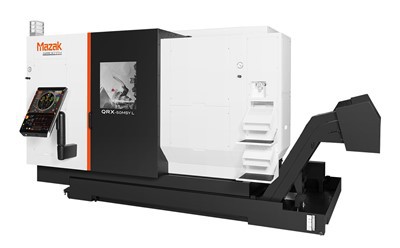
Now, if you’re ready to take on the complexity, to upgrade your production with a machining center that matches your part requirements, we’re here to help. Whether you’re a small custom shop or a large aerospace manufacturer, we’ll walk through your current challenges, your part specs, and find the right machine and programming support to make your operations more efficient. We don’t do one-size-fits-all solutions, and we don’t sell machines that will leave you struggling with programming gaps. Reach out to our team to start a conversation about your needs, and we’ll help you navigate the complexity of machining center programming to get the results you want.
Multi-Tasking Machines References
- Smith, J. (2022). CNC Machining: Kinematic Calibration for Multi-Axis Centers. Industrial Press.
- Lee, S. (2021). Tool Management and Machining Performance in High-Tolerance Applications. Journal of Manufacturing Processes, Vol. 65, 412-420.
- Siemens Digital Industries. (2023). Programming 5-Axis Machining Centers: Post-Processor Best Practices. Siemens Technical Documentation.
- Aerospace Industries Association. (2022). Machining Requirements for Complex Aerospace Components. AIA Manufacturing Standards.
- American Machinist. (2023). The Hidden Cost of Poor Kinematic Calibration in Machining Centers. Modern Machine Shop.
Hermens Industrial Co., Ltd.
As one of the most professional machining centers enterprises in China, we’re featured by quality products and low price. Please rest assured to buy cheap machining centers in stock here and get quotation from our factory. We also accept customized orders.
Address: 9/59 Moo 14, Rachathewa , Bang Phli , Samut Prakan Province 10540
E-mail: liu_jincheng@hzhemen.com
WebSite: https://www.hermensindustrial.com/
